
The TreeView Control
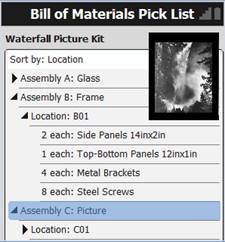
The TreeView object enables developers to present data in an outline format where information is sorted hierarchically. Each group (also called a parent) may contain child items and parent “containers” can be expanded or collapsed for ease of navigation to other parent items.
This object is very similar to the ListBox object except that the Tree supports multi-level, indented lists that can be expanded or collapsed at run time. For example to add data and manage the contents of the Tree, use VBA prompt extensions such as List.AddItem.
To add, populate, and manage the ColumnSets and Columns in a TreeView, first add the ColumnSet, then the Column (child property under ColumnSet), then select the Style such as CheckBox, Decimal etc. For more details see How to add ColumnSets and Columns.
For more details on commonly used properties, see Graphical Control Properties.
You can also add and stylize these properties using RFgen scripts. See the Developer's Reference Guide or view RFgen Scripting online help.